
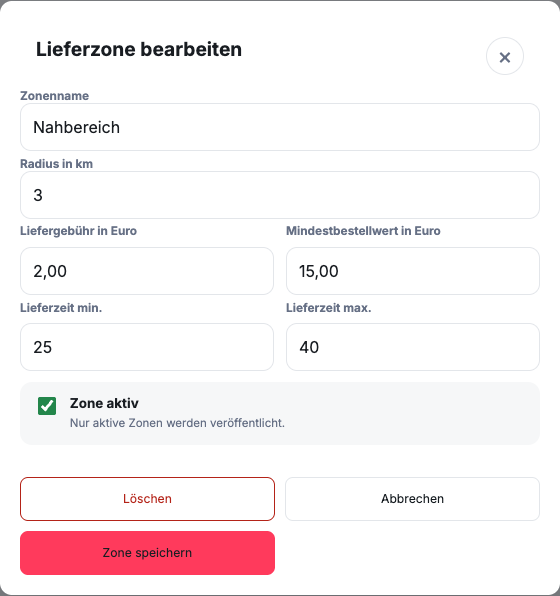
How do you open the appropriate fields?
- Open Delivery zones and click on the desired zone Edit.
- Check Zone name and Radius in km.
- Wear Delivery fee in euros and Minimum order value in euros a.
- Add if necessary Delivery time min. and Delivery time max. in minutes.
- Control Zone active and click on Save zone.
- Check the remaining changes and publish the new status.
For an address, the smallest suitable active radius determines the fee and minimum order value. The values in the screenshot are examples of input, not a recommendation for your calculation.
What information belongs to a delivery zone?
Minimum order value, delivery costs and delivery time can be set for each zone. Together, these values should match the distance and operational effort.
- Minimum order value: Value of goods that must be reached at least for delivery in the zone
- Delivery costs: additional amount for delivery to this area
- Delivery time: realistic time for preparation, packaging, handover and travel
Only use internally confirmed values. GastroSprint provides the technical check in the online ordering website, but does not automatically calculate the profitability of your delivery operation.
How do you maintain multiple zones?
Clearly assign each combination of radius and conditions. Check transitions between two zones so a guest doesn't see conflicting costs or times.
A more distant zone may require different conditions than the immediate surroundings. The assignment is made using the smallest suitable active radius. Especially check addresses near a zone boundary.
How do you control the change?
After publishing, test representative addresses from each zone. Create a shopping cart below and above the minimum order value and check delivery costs and the displayed time.
If the real workload regularly deviates from the specified delivery time, don't just adjust communication within the team. Also check if the zone, time or offered ordering window needs to be changed.