
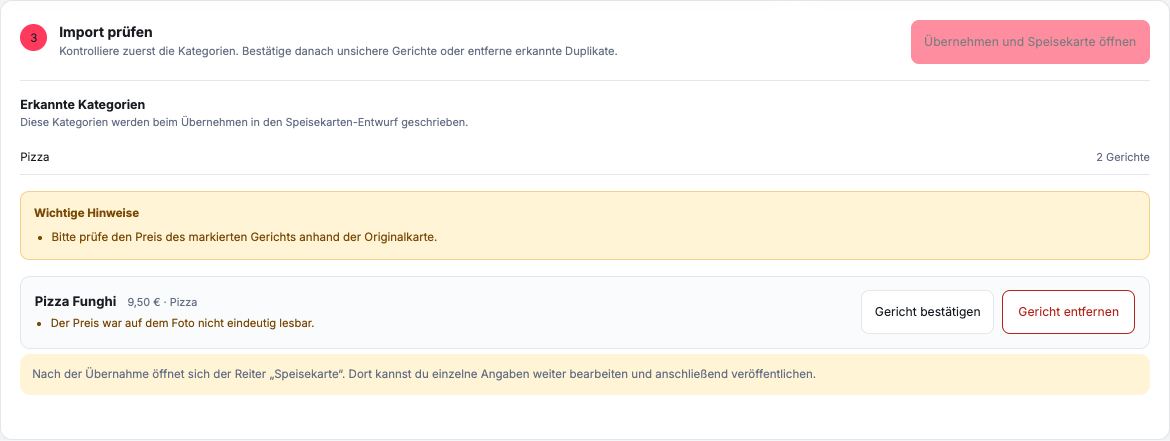
How do you work with “Check Import”?
Check first Recognized categories and Important notes. For a dish that needs review, the available options are Confirm dish and Remove dish available. Only confirm correct recognition; remove incorrectly recognized positions or duplicates. As long as marked dishes are unclear, remains Apply and open menu disabled.
The inspection card is not a complete entry form for price and description. After the takeover opens Menu. There you edit the transferred products in the tab Details and adds new positions if necessary.
The acquisition replaces the previous draft menu including categories and associated extras. Publish only after reviewing the entire new draft.
What do the warnings mean?
Warnings show content that the import could not safely or completely map. A warning is not an automatic correction and must not be confirmed without comparing it to the source file.
Typical inspection points include illegible prices, ambiguous product boundaries, missing categories or extras whose assignment is not clear from the card.
In what order should you check?
- Compare the number and names of the categories.
- Check each product for name, description and base price.
- Check variants and extras including their surcharges.
- Compare explicitly stated allergens and additives.
- Edit any visible warnings.
- Finally, randomly check entries without warnings.
Correct product data after adoption in the menu design. Don't just confirm a visibly false detection to unlock the takeover; remove the position and then create it correctly. If the source file itself is inconsistent, clarify the correct information with the restaurant rather than making a guess.
When can you take over the content?
Only carry out the import once the categories and marked dishes have been checked. Then check all other products in the menu design. The transfer takes the data into the draft, not automatically into the public online ordering website.
For major corrections, document internally which version of the menu served as the basis. This allows your team to later understand whether a difference comes from the source file, detection, or a manual change.