
Where can you find the publication?
In Menu the status is above the heading. In other care areas you will find it in the header area of the promotions. Unpublished changes present shows that the draft and the public status differ from one another.
- Save all desired entries in the respective forms.
- Click on Publish changes.
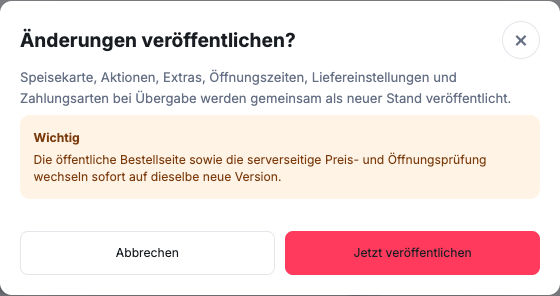
- Read the dialogue Publish changes? and check the entire scope.
- Only then confirm with Publish now or go with me Cancel back.
The menu, promotions, extras, opening times, delivery settings and payment methods upon delivery are published together. The release does not only affect the dish that was last opened. The public order page changes to the new status after successful publication.
Individual settings have their own process: Save email In the case of order notifications, for example, this applies immediately to new emails.
Why is a saved change not yet visible?
GastroSprint separates editing from publishing. This allows your team to prepare and review multiple related edits before guests see the new version.
If a notice of unpublished changes appears in the dashboard, the public menu is still at the previous status. This is intentional and protects against incomplete intermediate statuses.
What do you check before publishing?
Control the entire affected change, not just the last edited field:
- Categories and order
- Product names, descriptions and prices
- Variants, mandatory selections, extras and surcharges
- Images and availability
- Allergens and additives from the confirmed basis
- newly imported content and remaining warnings
Check the saved product data and selection rules in the dashboard. The customer preview under opening times shows the edited weekly times; it is not a cart preview for the entire design. You can check the changed shopping cart after it has been published in the public online ordering website without submitting the order.
How do you publish in a controlled manner?
Do not publish until a responsible person has reviewed the related changes. Use the designated action to publish and then check the public online ordering website on a smartphone or in a separate browser window.
Check at least one changed product and one unchanged position. This will help you determine whether both the new version and the rest of the catalog are displayed correctly.
Avoid releasing major menu changes in the middle of a busy period. If a correction is necessary, the team must be clearly aware of the new public status.